Invoice / Bill Module
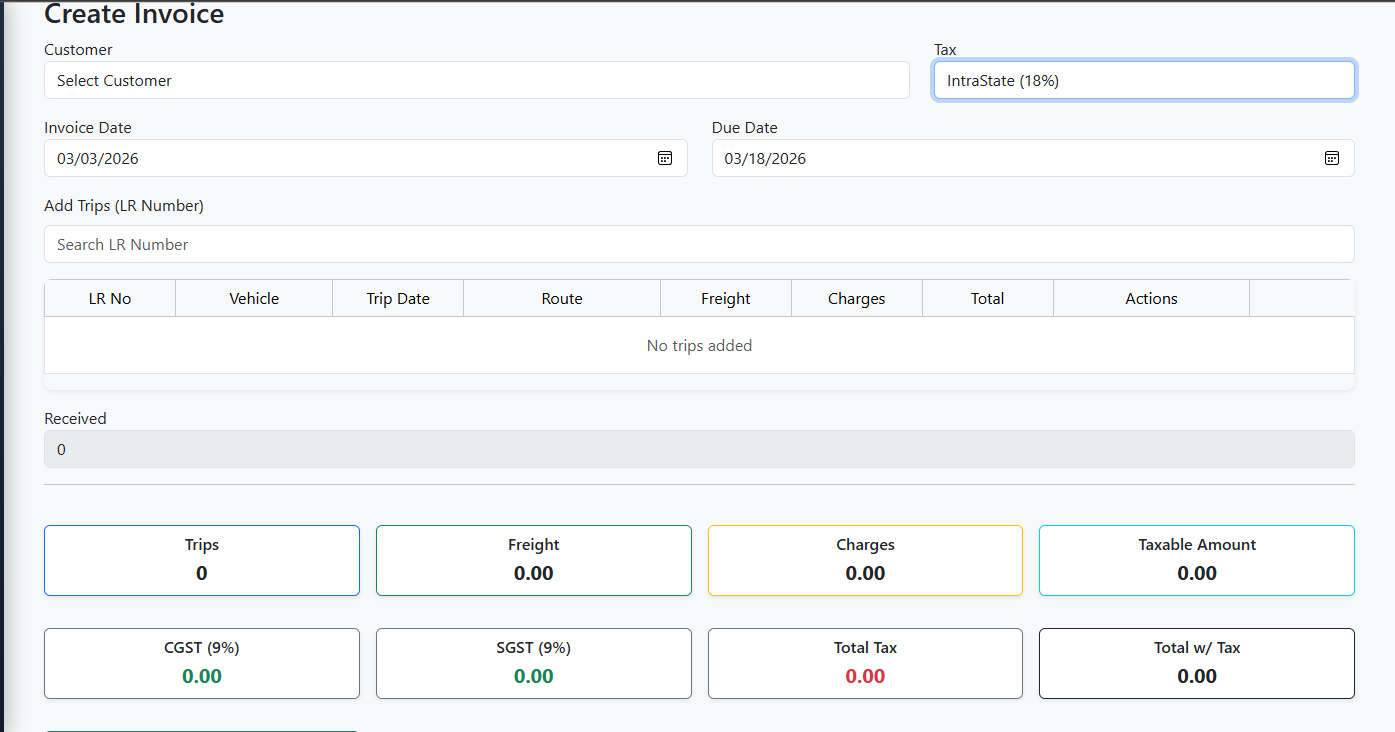
The Invoice / Bill Module in E-Trans Dashboard is used to create, update, and manage invoices linked to trips.
It allows users to select trips, compute totals, apply taxes, and manage customer billing.
🔹 Features
- Add new invoices or update existing invoices
- Select Customer and Tax type
- Autocomplete and add multiple trips by LR Number
- View trip materials in a modal
- Real-time calculation of:
- Number of trips
- Total Freight & Charges
- Taxable Amount
- CGST, SGST, IGST
- Total with tax
- Balance (Total minus Received)
- Validation for required fields and due dates
- Toast notifications for success, warnings, and errors
- Handles deletion restrictions if credit notes are associated with the invoice
🖥️ Form Fields
| Field | Type | Description |
|---|---|---|
| Customer | Dropdown | Select invoice customer |
| Tax | Dropdown | Select tax type (IntraState / InterState) |
| Invoice Date | Date | Date of invoice generation |
| Due Date | Date | Payment due date (min = invoice date) |
| Trips | Autocomplete / Table | Add trips via LR Number, shows LR, Vehicle, Date, Route, Freight, Charges, Total |
| Received | Number (readonly) | Amount already received |
| Trip Count | Computed | Number of trips added |
| Total Freight | Computed | Sum of freight for all trips |
| Total Charges | Computed | Sum of charges for all trips |
| Taxable Amount | Computed | Freight + Charges |
| CGST / SGST / IGST | Computed | Tax breakdown depending on tax type |
| Total Tax | Computed | Sum of all applicable taxes |
| Total with Tax | Computed | Taxable amount + total tax |
| Balance | Computed | Total with tax minus received amount |
🔗 API Endpoints
| Action | Method | Endpoint | Description |
|---|---|---|---|
| Add Invoice | POST | /bill |
Create a new invoice |
| Update Invoice | PUT | /bill/{id} |
Update an existing invoice |
| Get Invoice | GET | /bill/{id} |
Fetch invoice details |
| Customer List | GET | /customer?page=0&size=1000 |
List of customers |
| Taxes List | GET | /taxes |
List of available taxes |
| Trips Autocomplete | GET | /trips/autocomplete |
Search trips by LR number |
📝 Workflow
- Navigate to Bills / Invoice in the dashboard.
- Click Add Invoice or Edit Invoice.
- Fill in required fields:
- Select Customer and Tax
- Select Invoice Date and Due Date
- Add trips using the LR Number autocomplete.
- Trips display in a table with totals.
- Click the eye icon to view materials.
- Click trash icon to remove trips (restricted if linked to credit notes).
- Totals are auto-calculated including tax breakdown and balance.
- Click Save Invoice or Update Invoice.
- Toast notifications indicate success or error.
- The invoice list page is displayed upon successful save.
⚡ Tax Logic
- IntraState Tax → CGST + SGST
- InterState Tax → IGST
- Taxable Amount = Total Freight + Total Charges
- Total Tax = Sum of applicable taxes
- Total w/ Tax = Taxable Amount + Total Tax
- Balance = Total w/ Tax – Received
📷 Screenshot (Example)
 ```
```