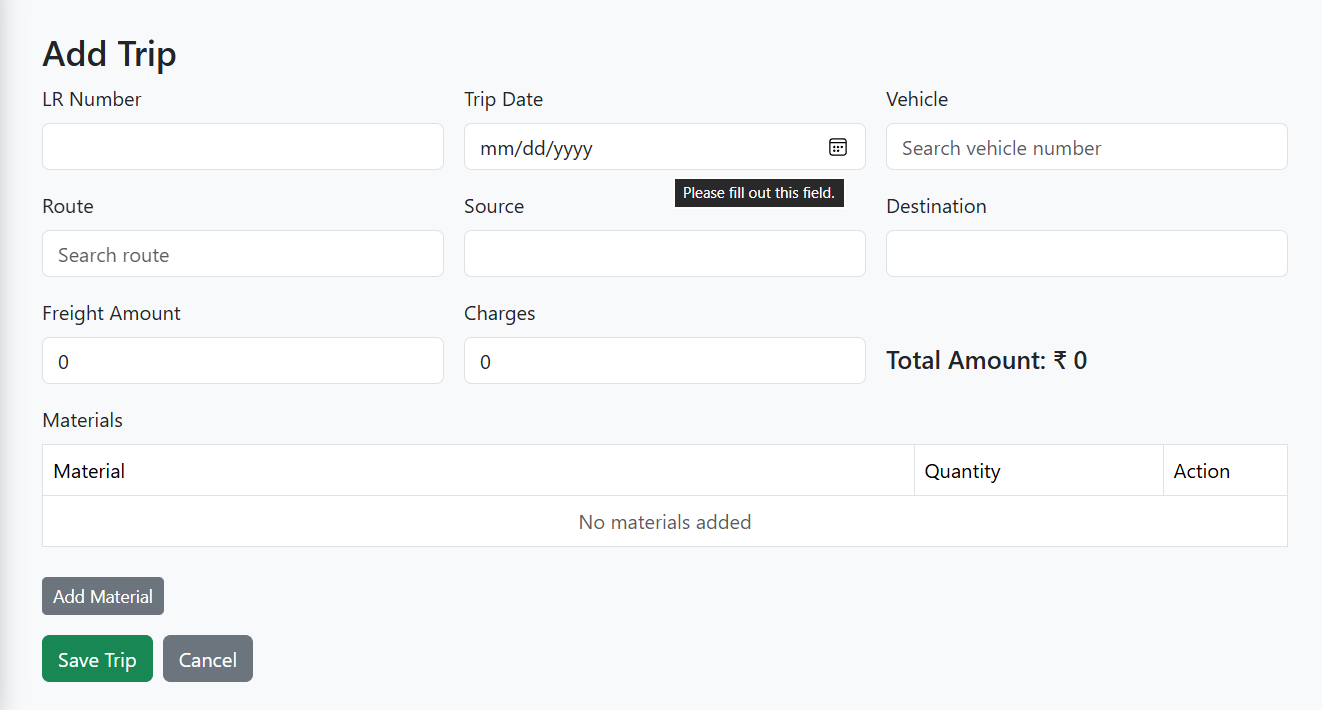
Trip / Outward Module
The Trip / Outward Module handles all trips or outward consignments in the E-Trans Dashboard.
It allows users to create, update, and manage trips, including vehicles, routes, materials, and financial details.
🔹 Features
- Add new trips and update existing trips
- Select vehicles with autocomplete & keyboard navigation
- Select routes with autocomplete
- Add multiple materials per trip with quantity and autocomplete
- Automatic calculation of total amount (
Freight - Advance + Charges - Deduction) - Toast notifications for success, warning, and error
- Real-time validation to ensure data integrity
🖥️ Form Fields
| Field | Type | Description |
|---|---|---|
| LR Number | Text | Unique LR number for the trip |
| Trip Date | Date | Date of the trip |
| Vehicle | Autocomplete | Vehicle number & transporter selection |
| Route | Autocomplete | Choose source & destination |
| Source | Text | Trip source location |
| Destination | Text | Trip destination location |
| Freight Amount | Number | Freight charges for the trip |
| Charges | Number | Additional charges |
| Deduction | Number | Deduction amount (optional) |
| Total Amount | Computed | Auto-calculated based on financials |
| Materials | Table | Add one or more materials with quantity |
📝 Example Usage (Vue 3 + Pinia)
const trip = reactive({
  lrNumber: '',
  tripDate: '',
  vehicleId: null,
  source: '',
  destination: '',
  freightAmount: 0,
  charges: 0,
  deduction: 0,
  totalAmount: 0,
  materialTripMapperDTOList: []
})

const saveTrip = async () => {
  if(!trip.materialTripMapperDTOList.length){
    toast.warning('Add at least 1 material')
    return
  }

  trip.totalAmount = trip.freightAmount - trip.advance + trip.charges - trip.deduction

  if(isEdit){
    await apiClient.put(`/trips/${trip.id}`, trip)
  } else {
    await apiClient.post('/trips', trip)
  }
}
🔗 API Endpoints
| Action | Method | Endpoint | Description |
|---|---|---|---|
| Add Trip | POST | /trips |
Add a new trip/outward |
| Update Trip | PUT | /trips/{id} |
Update an existing trip |
| Get Trip | GET | /trips/{id} |
Fetch trip details |
| Vehicle Autocomplete | GET | /vehicle/autocomplete |
Search vehicles for selection |
| Route Autocomplete | GET | /routes/autocomplete |
Search routes for selection |
| Material Autocomplete | GET | /material/autocomplete |
Search materials for selection |
✅ Workflow
- Navigate to Outward / Trips from the dashboard.
- Click Add Trip or Edit an existing trip.
-
Fill in trip details:
- LR Number, Trip Date, Vehicle, Route
- Source, Destination
- Financials: Freight, Charges, Deduction
- Add Materials with quantity.
- Click Save Trip or Update Trip.
- Toast notifications indicate success or errors.
- Upon success, the list view of trips is displayed.
📷 Screenshot (Example)