User Management Module
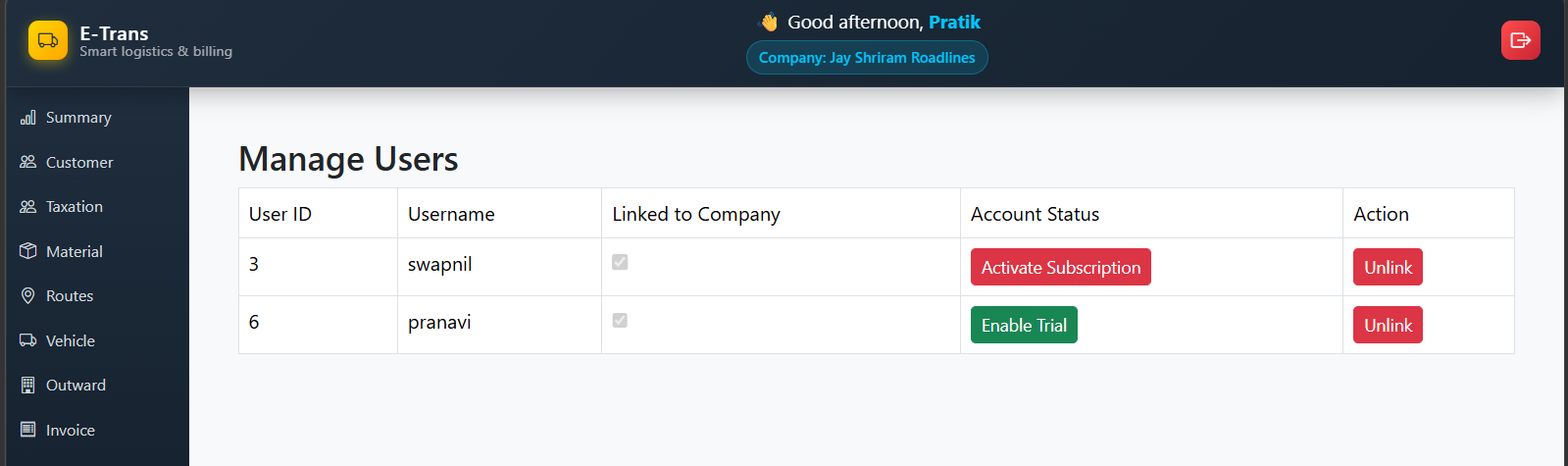
The User Management Module in E-Trans Dashboard allows administrators to link and unlink users to a company.
It provides a simple interface to manage user associations efficiently with confirmation dialogs and status indicators.
🔹 Features
- View all users and their link status with the company
- Link a user to the company
- Unlink a user from the company with confirmation modal
- Toast notifications for success or errors
- Disabled checkboxes indicate linked users
🖥️ Table Columns
| Column | Description |
|---|---|
| User ID | Unique identifier of the user |
| Username | User’s login name |
| Linked to Company | Checkbox showing if the user is linked (disabled) |
| Action | Buttons to link or unlink users |
🔗 API Endpoints
| Action | Method | Endpoint | Description |
|---|---|---|---|
| Fetch Users | GET | /dashboard/company/users |
Retrieves all users with link status |
| Link User | GET | /dashboard/company/link/{userId} |
Links a user to the company |
| Unlink User | GET | /dashboard/company/unlink/{userId} |
Unlinks a user from the company |
📝 Workflow
- Navigate to Manage Users in the dashboard.
- The table lists all users along with their link status.
- To link a user:
- Click the green Link button next to an unlinked user
- Toast confirms success
- To unlink a user:
- Click the red Unlink button next to a linked user
- Confirmation modal appears
- Confirm unlink to remove association
- Toast confirms success
- Users already linked cannot be linked again; their checkbox is disabled.
⚡ UI / UX Notes
- Confirmation Modal: Prevents accidental unlinking
- Responsive Table: Adapts to various screen sizes
- Toast Notifications: Immediate feedback for link/unlink actions
- Error Handling: Displays messages when API calls fail
📷 Screenshot (Example)