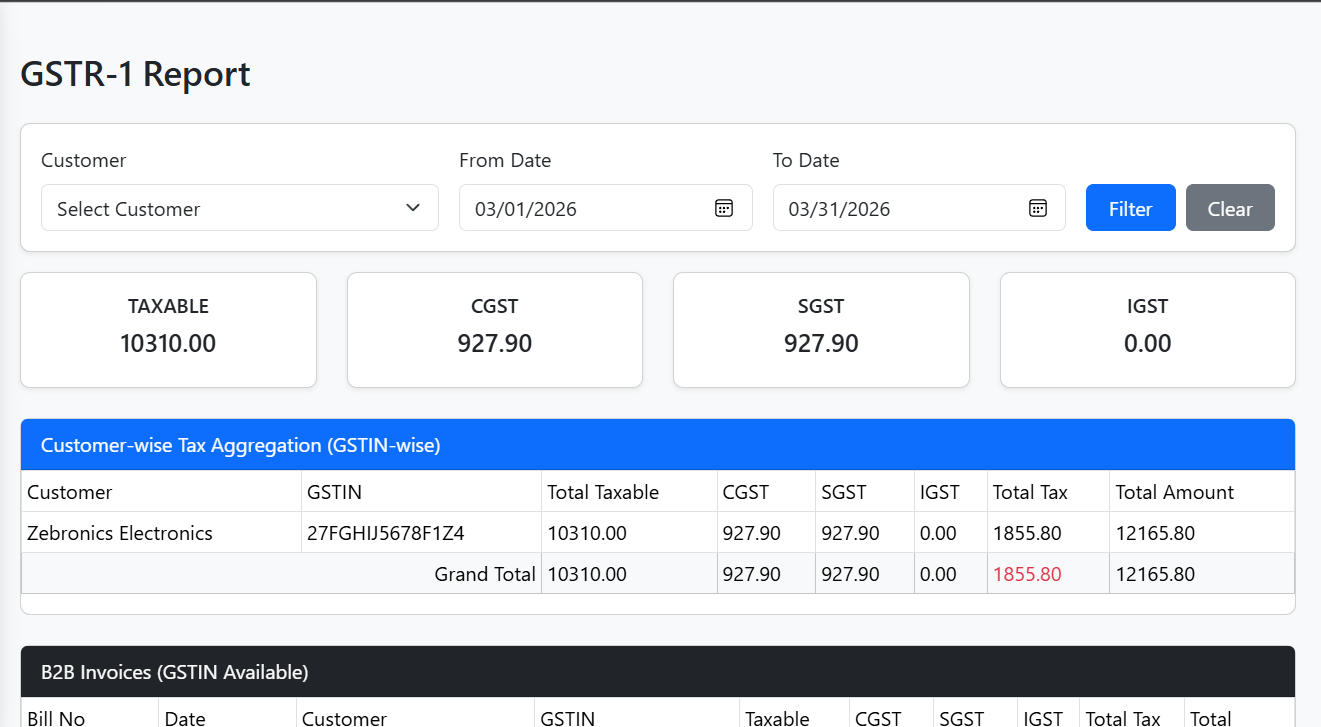
GSTR-1 Report Module
The GSTR-1 Report Module provides detailed GST reporting for B2B and B2C invoices. It allows filtering by customer and date range and generates summary, customer-wise aggregation, HSN summaries, and detailed invoice tables.
🔹 Features
1. Filters
- Customer: Select from all registered customers.
- From / To Dates: Filter invoices within a specific period.
- Filter / Clear Buttons: Apply filters or reset to default (current month).
2. Summary Cards
- Dynamic display of total Taxable Amount, CGST, SGST, IGST for the filtered period.
- Computed totals update automatically based on applied filters.
3. Customer-wise Tax Aggregation
- Aggregates B2B invoices by Customer & GSTIN.
- Columns include:
- Customer
- GSTIN
- Total Taxable
- CGST, SGST, IGST
- Total Tax
- Total Amount
- Includes Grand Total row in the footer.
4. B2B Invoice Table
- Displays invoices with valid GSTIN (B2B):
- Bill No, Date, Customer, GSTIN
- Taxable, CGST, SGST, IGST, Total Tax, Total Amount
- Includes Grand Total row.
5. B2C Invoice Table
- Displays invoices without GSTIN (B2C):
- Bill No, Date, Customer
- Taxable (Freight + Charges)
- Total Amount
- Includes Grand Total row.
6. HSN Summary (Material-Based)
- Aggregates quantity of each material transported.
- Displays:
- Material Description
- Total Quantity
- Includes Total Quantity row.
🔗 API Endpoints
| Action | Method | Endpoint | Description |
|---|---|---|---|
| Fetch Customers | GET | /customer |
Returns all customers for filter dropdown |
| Fetch Filtered Invoices / Reports | GET | /dashboard/filter |
Returns filtered invoices for GSTR-1 reporting |
Query Parameters for /dashboard/filter:
customerId(optional) → filter by specific customerfromDate(optional) → start date (yyyy-mm-dd)toDate(optional) → end date (yyyy-mm-dd)page(optional, default 0) → paginationsize(optional, default 100) → number of records per page
📝 Workflow
- Load Reports:
- On component mount, fetch customers and default invoice data (current month).
- Filtering:
- Select customer or date range → apply filters → fetch filtered report.
- Clear resets filters to default and reloads data.
- Data Aggregation:
- B2B invoices: Filtered by valid GSTIN and taxId.
- B2C invoices: Filtered as invoices without GSTIN.
- Customer-wise summary: Aggregates B2B invoices by GSTIN.
- Totals: Overall taxable, CGST, SGST, IGST for displayed invoices.
- HSN summary: Aggregates quantities per material.
🔹 Computed Properties
| Computed Property | Purpose |
|---|---|
b2bInvoices |
Filters invoices with GSTIN and taxId |
b2cInvoices |
Filters invoices without taxId |
customerWiseSummary |
Aggregates B2B invoices by GSTIN |
customerTotals |
Totals for customer-wise aggregation |
b2bTotals |
Totals for all B2B invoices |
b2cTotals |
Totals for all B2C invoices |
hsnSummary |
Aggregates material quantities from trips |
hsnTotalQty |
Total quantity of all HSN items |
🔹 Helpers
format(val)→ Formats numbers to two decimal places.formatForInput(date)→ Converts JSDateobject toyyyy-mm-ddfor input fields.
⚡ UI / UX Notes
- Responsive tables with scrollable horizontal layout.
- Grand totals are clearly highlighted using table footers.
- Filter cards provide clean layout with gap for buttons.
- Card styling for summaries and tables ensures consistency.
- Dynamic computation ensures real-time updates when filters are applied.
E-Trans Admin Reporting System Documentation
Table of Contents
- Overview
-
Dashboard Summary Module
- Filters
- Summary Cards
- Charts
- Paginated Invoices Table
- API Endpoints
-
GSTR-1 Report Module
- Filters
- Summary Cards
- Customer-wise Aggregation
- B2B / B2C Reports
- HSN Summary
- API Endpoints
- Common API Authentication and Refresh Mechanism
- Notes on Computed Summaries and Aggregation Logic
Module Hierarchy
E-Trans Admin
│
├── Dashboard Summary
│   ├── Filters
│   │   ├── Year / Month / Quarter
│   │   ├── Start / End Date
│   │   └── Search (Customer / Vehicle / Bill No)
│   ├── Summary Cards
│   │   ├── Total Revenue
│   │   ├── Total Received
│   │   └── Total Pending
│   ├── Charts
│   │   ├── Top 5 Customer Revenue
│   │   ├── Monthly Revenue Trend
│   │   ├── Pending vs Received
│   │   └── Vehicle Revenue
│   └── Paginated Invoices Table
│       └── Bill No, Customer, Vehicle(s), Total, Received, Balance
│
└── GSTR-1 Report
    ├── Filters
    │   ├── Customer
    │   ├── From Date / To Date
    │   └── Apply / Clear buttons
    ├── Summary Cards
    │   └── Total Taxable, CGST, SGST, IGST
    ├── Customer-wise Aggregation
    │   └── GSTIN-wise aggregation
    ├── B2B Invoices
    │   └── GSTIN available
    ├── B2C Invoices
    │   └── No GST
    └── HSN Summary
        └── Material-wise total quantity
API Mapping
| Module | Endpoint | Method | Parameters | Description |
|---|---|---|---|---|
| Dashboard Summary | /dashboard/summary |
GET | year, month, startDate, endDate, search, page, size |
Fetch summary metrics, charts data, and paginated bills |
| Dashboard Summary | /dashboard/suggestions |
GET | query |
Autocomplete for customer/vehicle/bill search |
| GSTR-1 Report | /dashboard/filter |
GET | customerId, fromDate, toDate, page, size |
Fetch filtered invoice data for reports |
| Customers | /customer |
GET | page, size |
Fetch customer master data |
| Authentication | /auth/login |
POST | username, password |
Login |
| Authentication | /auth/refresh |
POST | refreshToken |
Refresh expired access token |
Filter and Summary Details
Dashboard Summary Filters
- Year / Month / Quarter: Auto-updates
startDateandendDate - Start / End Date: Custom date range
- Search: Customer / Vehicle / Bill No with autocomplete suggestions
- Apply / Clear: Fetch or reset filters
Dashboard Summary Computed Metrics
totalRevenue,totalReceived,totalPending- Charts: top 5 customers, monthly trend, pending vs received, vehicle revenue
GSTR-1 Filters
- Customer: Optional filter
- From / To Date: Defaults to current month
- Apply / Clear: Fetch or reset filters
GSTR-1 Computed Metrics
- Customer-wise Aggregation: Taxable, CGST, SGST, IGST, Total Tax, Total Amount
- B2B vs B2C Invoice Segregation
- HSN Summary: Material-wise quantity aggregation
Authentication Flow
- Axios instance attaches Bearer token automatically
- Handles
401with refresh token logic - Queues requests while refreshing
- Logs out user if refresh fails
📷 Screenshot (Example)