Invoice (Bill) Master Module
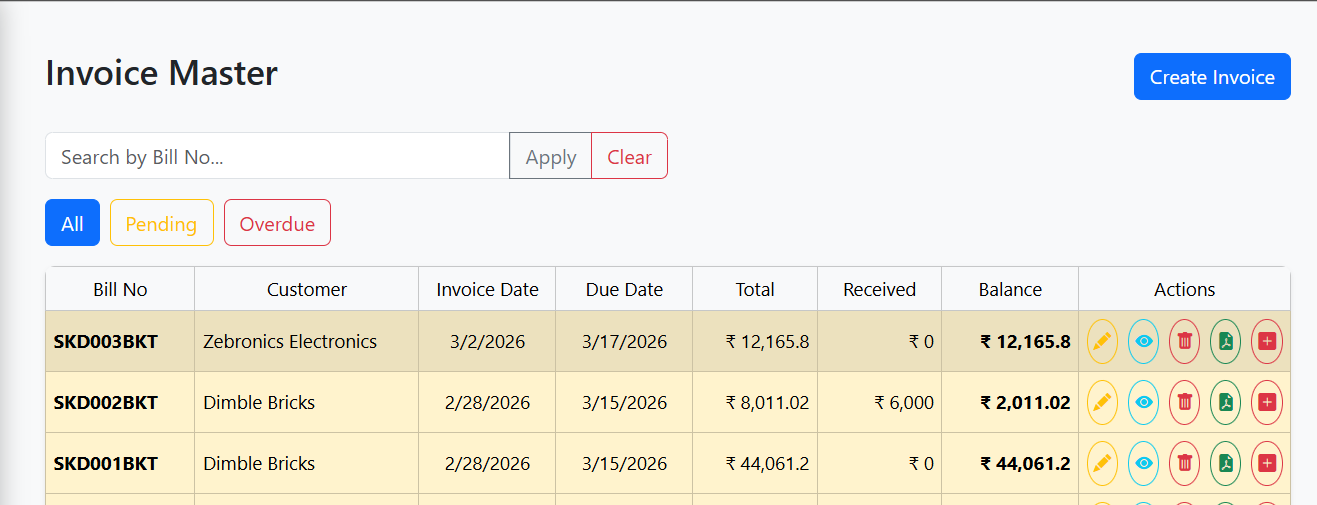
The Invoice Master Module provides a comprehensive view of all invoices in E-Trans Dashboard, allowing users to create, view, edit, delete, export, and manage credit notes for invoices.
🔹 Features
- Create Invoice: Quick access to create a new invoice.
- Search & Autocomplete: Search invoices by Bill No with real-time suggestions.
- Filter Buttons: View all invoices, pending invoices, or overdue invoices.
- Invoice Table: Display invoice details including:
- Bill No
- Customer
- Invoice Date & Due Date
- Total Amount, Received Amount, Balance
- Row Highlighting:
- Green for fully paid invoices
- Yellow for pending invoices
- Red for overdue invoices
- Actions per Invoice:
- Update/Edit invoice (if balance > 0)
- View invoice details
- Delete invoice (with confirmation and credit note check)
- Export PDF (admin only)
- Add Credit Note (admin only, if balance > 0)
- View Modal: Shows full invoice details including associated trips and materials.
- Pagination: Navigate through pages of invoices.
- Error Handling: Handles failed API requests gracefully.
🖥️ Table Columns
| Column | Description |
|---|---|
| Bill No | Unique identifier for the invoice |
| Customer | Customer name |
| Invoice Date | Date invoice was generated |
| Due Date | Payment due date |
| Total | Total amount of invoice |
| Received | Amount received |
| Balance | Outstanding balance |
| Actions | Buttons for edit, view, delete, export, and add credit note |
🔗 API Endpoints
| Action | Method | Endpoint | Description |
|---|---|---|---|
| List Bills | GET | /bill |
Fetch paginated list of invoices |
| Autocomplete Search | GET | /bill/autocomplete |
Fetch suggestions for invoice search |
| Delete Bill | DELETE | /bill/{billId} |
Delete invoice if no associated credit notes |
| Export Invoice PDF | GET | /export/bill/{billId}/pdf |
Export invoice as PDF |
| Redirect to Add Credit Note | Router | /dashboard/credit-notes/add |
Autofills credit note form from selected invoice |
📝 Workflow
- Create Invoice: Click the
Create Invoicebutton to open the new invoice form. - Search Invoice: Type Bill No in the search box; autocomplete suggestions will appear.
- Filter Invoices: Click “All”, “Pending”, or “Overdue” to filter the table.
- Invoice Actions:
- Edit: Click the pencil icon if invoice balance > 0.
- View: Click the eye icon to view invoice and trips details.
- Delete: Click the trash icon; modal will warn if credit notes exist.
- Export PDF: Admins can download invoice as PDF.
- Add Credit Note: Admins can add a credit note for outstanding invoices.
- Pagination: Navigate through pages using pagination controls.
- View Modal: Displays invoice totals, trips, and materials in a structured table.
⚡ UI / UX Notes
- Autocomplete Suggestions: Shows up to 200px dropdown with active highlight.
- Row Highlighting: Improves readability and identifies payment status instantly.
- Confirmation Modals: Protects against accidental deletion of invoices.
- Responsive Table: Works on different screen sizes and devices.
- Action Buttons: Disabled or hidden based on user role and invoice balance.
📷 Screenshot (Example)