Reports Master Module
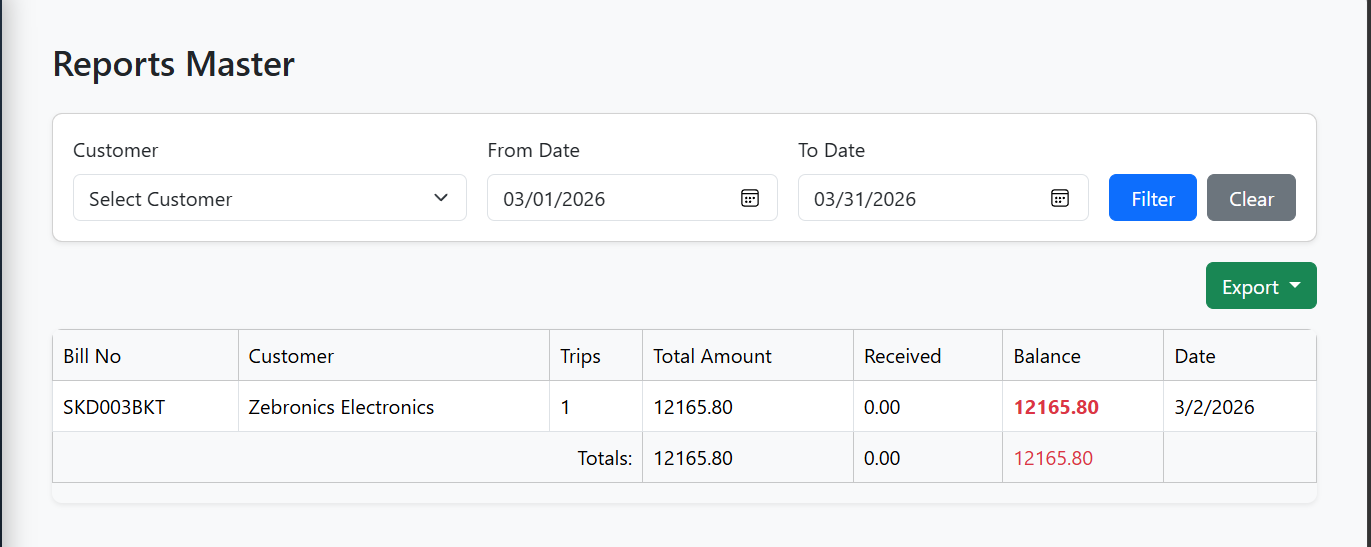
The Reports Master Module in E-Trans Dashboard allows users to view, filter, summarize, and export invoices and trips reports for better decision-making.
🔹 Features
- Filter by Customer and Date Range
- Select a customer from the dropdown
- Choose a
From DateandTo Date - Apply or clear filters with dedicated buttons
- Export Reports
- Export reports as Excel files
- Options for Summary Report or Detailed Report
- Filename auto-adjusts based on customer selection and report type
- Reports Table
Displays the following columns for each bill:- Bill No – Unique invoice number
- Customer – Customer name
- Trips – Number of trips in the invoice
- Total Amount – Total invoice amount
- Received – Amount received
- Balance – Outstanding amount (highlighted red if >0, green if 0)
- Date – Invoice date
- Totals Row
- Displays sum of Total Amount, Received, and Balance at the bottom of the table
- Pagination
- Navigate through pages of reports with previous/next buttons and page numbers
- Responsive Design
- Works across desktop and mobile screens
- Hover effects for better readability
- Loading Indicators
- Shows spinner while fetching data or exporting
🖥️ Table Columns
| Column | Description |
|---|---|
| Bill No | Unique invoice number |
| Customer | Customer name |
| Trips | Number of trips associated with the invoice |
| Total Amount | Total invoice amount |
| Received | Total amount received |
| Balance | Outstanding balance (red if >0, green if 0) |
| Date | Invoice date |
🔗 API Endpoints
| Action | Method | Endpoint | Description |
|---|---|---|---|
| Fetch Reports | GET | /dashboard/filter |
Returns filtered list of invoices with pagination |
| Fetch Customers | GET | /customer |
Returns list of customers for filter dropdown |
| Export Excel (Summary/Detailed) | GET | /export/bill/excel |
Exports report as Excel file, supports detailed=true/false and filters |
📝 Workflow
- Load Page: Reports load automatically for the current month by default.
- Apply Filters:
- Select customer and date range → click Filter
- Table updates dynamically with filtered data
- Clear Filters: Resets customer and dates → fetches all records
- Export Report:
- Click Export → choose Summary or Detailed
- Excel file downloads automatically
- Pagination:
- Navigate using page numbers or previous/next buttons
- Data Totals:
- Automatically computes total amount, total received, and total balance
⚡ UI / UX Notes
- Highlighting: Outstanding balances are visually distinguished for clarity
- Dropdowns: Customer list is fetched dynamically with large dataset support
- Loading Spinner: Appears on Export or API fetch operations
- Responsive Tables: Table adapts to screen width while keeping all columns readable
📷 Screenshot (Example)